Over the last few years, I’ve spent a lot of time at the intersection of complex business data and custom business software. Building version one of the Icehouse Ventures investor portal meant taking financial data that had lived in Excel and Microsoft Access for years and turning it into a database that could power real software.
The gap between a random spreadsheet and “structured data” is bigger than most people realise. Excel is a magical tool for financial analysis but it’s not really designed to be a database, CRM or layout tool. Yet somehow all of use have reached for Excel (or Google Sheets) as a project management timeline, customer list, RSVP tracker or product requirements list. It’s fast, has just enough structure (rows and columns) and just enough flexibility (colours, borders and headings).
The problems I’ve run into most when being handed someone else’s spreadsheet aren’t really complexity problems. They’re habits and hygiene. Practices that are completely sensible to the person who built the spreadsheet, but completely invisible to the poor analyst, engineeer or agent that has to process it. Here are the common spreadsheet habits that have caused me the most pain.
Colour as Data
It’s the most natural thing in the world to slap colour on a spreadsheet when you are in a hurry. Red text for overdue. Green cells for approved. Yellow for someone-needs-to-follow-up. It looks clean. It communicates at a glance. The problem is that colour lives in the formatting layer, not the data layer. When someone has to export your spreadsheet to CSV, or push it through an API, or feed it to an AI agent the colour is gone. Whatever you were communicating with it disappears.
The simple fix is an explicit column. If red means “Overdue”, add a Status column and write “Overdue”. It’s a bit more typing upfront and a lot less confusion downstream.
Layout as Meaning
This one is more subtle. You have a list of transactions and instead of repeating “Q1 2024” on every row, you put it as a bold sub-heading (with a nice horizonal row underline to break things up) above the relevant rows. Visually? Elegant. Semantically? A problem. Here’s a test: if someone innocently re-sorted your spreadsheet alphabetically before it was handed to your tech team, would the sheet lose information? If the answer is yes, your data is broken.
Meaning has to survive re-sorting. A nice subheading that provides the only context for all the grouped rows below it doesn’t survive. The rows scatter, the heading stays put, and the relationship is gone. (And don’t get me started on merged cells and indentations across columns.) The fix again is a simple additional column. Repeat the category value on every row. It looks redundant. But it isn’t. That’s just what tidy data looks like.
Hiding Things
Excel’s “hide” feature is genuinely useful for skimming large data and non-destructive analysis. (Although, I’d rather people used Pivot Tables and the Auto-filter tool). But for data handoffs, hidden rows and columns are a nasty trap. When you export a spreadsheet with hidden rows or columns to CSV, everything comes across whether hidden or not. The recipient (me, your SaaS or your agent) has no way of knowing those rows exist unless they go looking in the original XLS for something that “isn’t there”. Automated pipelines certainly won’t and I almost imported several thousand hidden rows this week. This is particularly unpleasant because the bug is silent. The data looks clean, processes without error, and yet produces wrong numbers. Simple fix: Before handing off data, delete hidden rows and columns rather than hiding them. Or unhide everything and make a conscious decision about whether those rows belong.
Mixing Tags and Categories
These two concepts are easy to confuse and important to keep separate. A category is mutually exclusive and exhaustive. Every item belongs to exactly one. “Investment stage” is a category, a startup company is either Seed Stage or Series A, not both. A “bridge or extension” could be a valid modifier, but not an excuse to put the same company in to stages at once.
By contrast, a tag is optional and multiple. An item might have none, one, or many. “Themes we’re tracking” is a tag, a company could be operating at the intersection of AI, climate, and fintech simultaneously. The tell is comma-separated values inside a single cell: “AI, Climate, Fintech”. That’s a one-to-many relationship crammed into a one-to-one field. Perfectly readable as text, but risky as a data structure. If you find yourself reaching for the comma key inside a cell, that’s usually a sign the dataset has outgrown what a flat spreadsheet can do cleanly.
The fix: Categories get their own column. Tags either get individual columns with yes/no inside or a cell with commas and some coherence to avoid entropy or realistically the data moves to a proper database with a proper join to the pick-list.
Invisible Duplicates
Not all duplicates are errors. The same investor appearing twice in a list might be intentional, maybe a married couple sharing an email inbox, or two different people who happen to have the same name. The problem is when duplicates are ambiguous and there’s no way to tell. De-duplication is one of the most time-consuming parts of any data migration, and it’s made much worse when rows don’t carry any tie-breaker information. The fix is an additional identifier like email address, LinkedIn URL, phone number, website, company registration number. These serve two purposes: they let you merge genuinely duplicate records with more confidence, and they make intentional “twins but not duplicates” (same name, different person) immediately legible.
Seeing the patterns
Most of these problems have the same root cause: encoding information in ways that make sense to human eyes but are invisible to machines, databases, and agents. Colour, layout, hiden rows, and comma-delimited multi-values are all presentation tricks. They’re not “data”.
Good business data is explicit, survives re-sorting, and exporting, lives in labelled columns, and means one thing per cell. The closer your spreadsheet looks to a database table, the less translation work stands between your data and something useful. And in a world where AI agents, APIs and automated workflows are increasingly the ones doing that translation, the gap between “looks right” and “is right” matters more than ever.
As technology becomes central to modern business functions, professionals in marketing, finance, and operations increasingly want to tackle projects traditionally reserved for software developers. Having transitioned from corporate law to marketing and then to software development, I’ve gathered tips to make the journey into vibe coding easier and more enjoyable.
Modern AI tools significantly lower the barrier to entry for coding, but there is still a learning curve to being productive in a business setting. My goal here isn’t to turn you into a full-time software engineer, instead the goal is for you to use AI to better understand and work with complex business systems. You can use modern AI coding tools to explore, tweak and build business workflows in hours that would have traditionally taken weeks to implement.
Why Laravel?
Beginners and non developers are often steered by AI toward JavaScript frameworks like Next and React, or Python for data science. I think this is a mistake because:
PHP has 20 years of open-source history, giving LLM models rich context for solving any business problem you encounter. The training examples and content for Laravel apps are often practical B2B SaaS in complex industries like finance, healthcare and manufacturing. Laravel is used by Apple, NASA, Ferrari, DHL, Square Payments, The New York Times, Marvel and OpenAI along with thousands of SaaS startups and in-house custom business applications.
Laravel is a powerful framework that includes robust authentication and database setup out of the box—features that beginners often struggle to implement securely.
PHP excels at rapid prototyping. Plus, if your business has an in-house SaaS platform, there’s a good chance it’s built in Laravel. It makes more sense to learn Laravel from the start rather than coding everything in React only to switch languages later.
The fundamental model of Laravel with MVC, database and logic layer makes it the preferred choice for a lot of SaaS startups, in-house tech teams and digital agencies building rapid prototype software for clients.
Personally, I’ve fallen in love with Laravel because of the helpful community and the focus on clean, minimalist code. The framework is magical for taking complex business domains like investment, finance, education, health or other industries and building software that solves real business problems fast. With AI tools improving rapidly, real code is rapidly replacing low-code tools as the best way to spin up software to streamline business processes.
Every day I’m thankful that we made the call to build the Icehouse Ventures in-house investor portal in Laravel because we have complete flexibility to add features and customisations that suit our exact business model (a large and diverse network of investors making long-term investments into a widely diversified portfolio of tech startups). Using Laravel for the last five years has helped us scale to become the largest and most active Venture Capital firm in New Zealand. Having custom software has allowed us to build investor and founder support functionality, data analysis, and advanced automations that no other VC firm has access to.
Laravel has robust tooling for solving business problems such as custom CRM systems, automating workflows, modelling complex business processes, and integrating with third party APIs data sources. Imagine Excel, HubSpot, Salesforce, Zapier and Notion all in one place and with complete freedom to wire things together in ways that suit your exact business.
Setting up your machine
To start using Laravel you’ll need to set up your machine. Hardcore engineers spend most of their time on the command line for tooling and setup. One of the things that helped me transition into development and suits my big-picture desire for an overview of what’s going on in a system is to use a lot of GUI or visual tools. I find that visual tools make it much easier to understand how a Laravel application works and how to make changes. There are a few key tools that will help you get started:
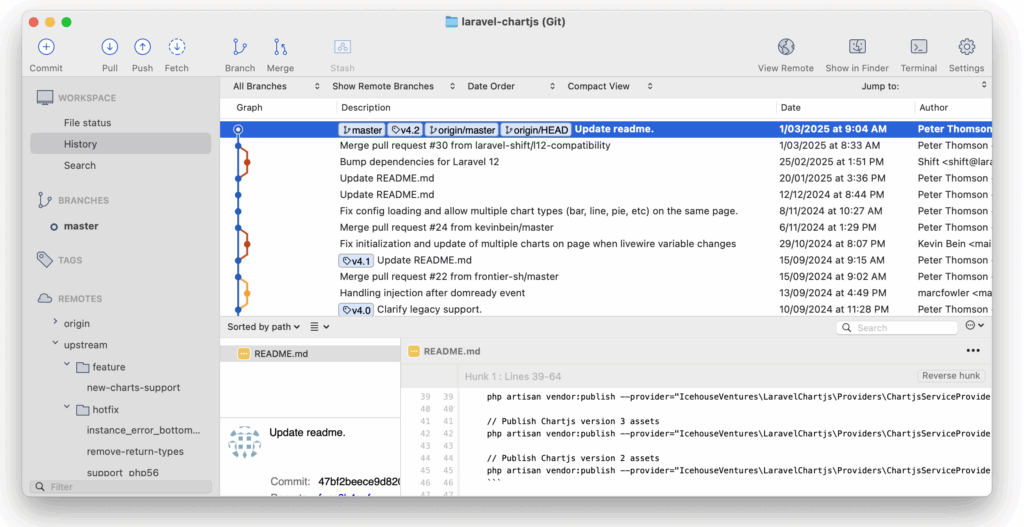
Version Control: SourceTree
Version control is like a giant upgraded version of a word processor’s ‘track changes’ feature. Full time software developers use version control systems to make sure that they can’t lose their work and that multiple people can work on a project at the same time. It’s useful to have a version control tool on your machine so that you can see the other branches of code and it provides a simple place to make forks of code and to review your changes.
Github is where your company’s code base is most likely contained. SourceTree is a great git client that provides a visual interface for managing your codebase. It makes it easy to commit, push, and pull changes, as well as resolve merge conflicts. Version control is essential when working with AI code tools because it lets you experiment without breaking the main codebase.
Database: TablePlus
A relational database is like a giant spreadsheet with lots of tabs and links between the rows. The database is a key part of a modern web application so you’ll need a way to access your local copy of the database and to see what’s going on. Sequel Pro and TablePlus are both excellent visual tools for accessing a local database so you can see the changes that your application is making. You’ll set up your application’s database later in the process, but having a database viewer set up early will help you debug things and access the database manually as soon as it’s loaded.
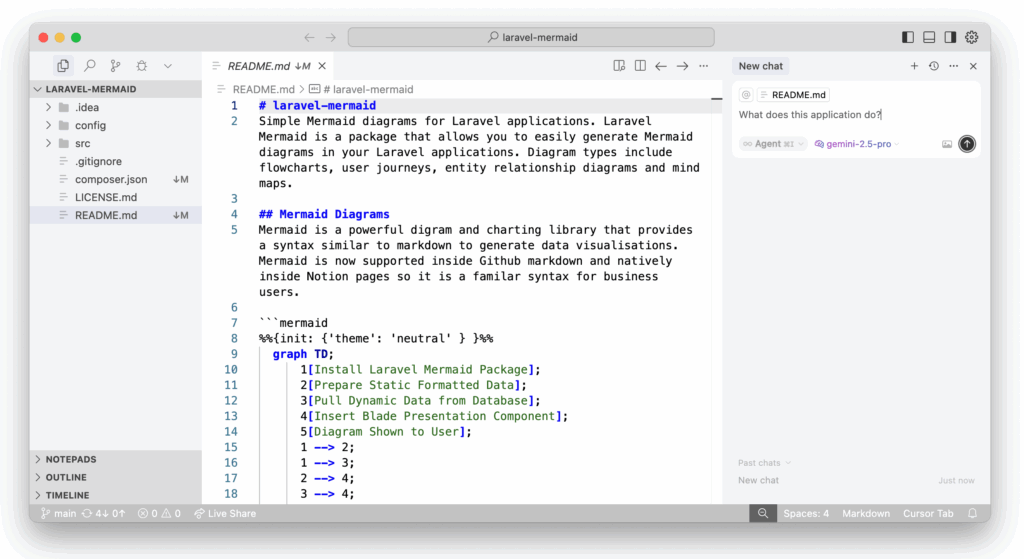
Text Editor: Cursor
An integrated development environment is like a word processor specially designed for software development. I personally use Sublime as my text editor for its speed, calm interface, and minimalist design. However, for business professionals accessing their company’s codebase, I recommend Cursor. It combines VSCode’s benefits (plugins and customizability) with powerful integrated AI support.
Cursor’s AI support has several evolving layers, and it’s worth understanding how each can help you engage with a codebase:
Tab / Autocomplete Mode – Works well with existing Laravel code to add small features and tweak the wording on web pages.
Chat / Ask Mode – Great for exploring the code without making unnecessary changes.
Agent / Edit Mode – Modern LLMs can make significant progress on building new functionality in a Laravel app. But they need careful guidance and clear instructions.
Bug Fix / Pull Request Mode – This allows you to review changes and do quality control.
Cursor Plugins
There are a few things you can do to set up Cursor to work really well for Laravel development:
Laravel – The official VS Code plugin helps Cursor to understand Laravel code.
PHP Intellephense – This is what allows you to click through different functions and see the context for the code.
Back & Forth – This adds a ‘back button’ to the top of the editor window which is awesome for navigating around the code base.
Duplicate File – A better copy/paste that makes the sidebar faster for duplicating files (which you’ll be doing a lot of if you’re starting out).
Cursor AI Setup
There are several things you can do to get the most out of modern AI support:
Add a Cursor rules file to your project if there isn’t already one. This should contain some context on the application and a style guide.
Add links to the Laravel documentation to your Cursor “docs” setup. I use the secret Laravel Illuminate API docs which are a machine readable version of the human Laravel documentation.
Like with other advanced business projects it’s worth chatting with an LLM before starting work to make a plan and an outline. You can add these to Cursor by adding a file such as “project_plan.mdc” (markdown format) to the home folder of your project. Then add that to the context when asking the AI for help with specific tasks.
Virtual Machine: Herd
Laravel has several methods for getting a local copy of a code base running on your machine. Docker and Valet are both excellent options but there days Laravel Herd is the fastest way to get up and running. The virtual machine is what allows the application code that usually powers a website to run locally on your own machine without the internet. You can access the website using a normal web browser but instead of calling the internet, it just calls your local machine.
Scratchpad: Tinkerwell
One of the tools I wish I’d had earlier in my journey was a way to run tiny blocks of code without having to change the whole application. Tinkerwell is a tool that lets you write standalone php code and run it with the context of your Laravel application. It’s rocket-fuel for experimenting with random ideas. For example, I recently used Tinkerwell to loop through our portfolio and analyse the gender balance of founders without needing to write permanent code or do a pivot table in excel.
Getting Started: Laravel Starter Kits
The Laravel Documentation has good examples of how to create your first Laravel application. Personally I’d suggest choosing a simple first-party Laravel Livewire starter kit with Tailwind. There are lots of third party starter kits with React, Vue and other front-ends but Livewire keeps things simple. The official Laravel documentation has a great step-by-step guide to seeing up your first Laravel application.
Laravel Cloud provides a fast and easy place to deploy your first application if you need to share it with other people for testing. There are also lots of great resources on how to deploy a Laravel application to AWS and other web hosting platforms.
Key Concepts
There are a few key concepts that really help when experimenting with a code base and when discussing project with your development team.
Model View Controller
The Model-View-Controller (MVC) architectural pattern is a fundamental concept in Laravel. It separates the application logic into three interconnected components: the Model handles data management, the View manages the user interface, and the Controller acts as the intermediary, processing user input and coordinating the flow of data between the Model and View. Think of MVC like a restaurant: the kitchen (Model) prepares the food (from ingredients like the database and any APIs), the waiter (Controller) takes orders and delivers food, and the front of house dining area (View) presents the meal.
Relational Databases
Relational databases are the backbone of most Laravel applications, providing a structured way to store and retrieve data. Familiarizing yourself with concepts like tables, columns, rows, and relationships will help you understand how to model your application’s data and leverage Laravel’s powerful Eloquent ORM (Object-Relational Mapping) to interact with the database. This knowledge will empower you to create robust data-driven applications that can scale and adapt to your business needs.
Database Seeding
If you are starting out with a new application to experiment or your business is in an industry where sharing production data is prevented for privacy reasons then it may be better for you to use synthetic data. Most teams will have a masked-data dump or a test database available but it’s worth understanding the concept of Seeders in Laravel as they allow you to create your own test data. Seeders are a command that creates multiple fake but realistic rows in the database and links them together. Using fake data makes it much safer to test new ideas.
Test Driven Development
Laravel has automated testing out of the box. If you are building a new feature or a proof of concept then adding automated tests is a great way to guide the AI and to prove to the rest of your team that you’ve thought through what you’re trying to achieve. I use a lot of “smoke tests” which means if you try the thing using the happy path (all data in place and doing the main thing the page does), does it work or does it smoke / catch fire when you turn it on. LLMs are great at generating tests and knowing that the tests pass is a good way to check the AI’s work.
Proof of Concept
The concept of minimum viable product comes from venture capital and is a great thing to work towards. But if you’re vibe coding it’s more sensible to aim for a simple “proof of concept” which is code that isn’t intended to be ‘viable’ as in secure, performance optimised and robust enough for production. Instead, a proof of concept is intended to demonstrate the functionality you want in a proposed feature and to help visually communicate across teams. Traditionally this would have been done with paper sketches, prototype or design tools. But with rapid AI advances it’s often useful for business users to have a go at exploring the proof of concept themselves.
Being a team player
If you are working in an existing code base there are some unspoken rules that can help you be a good citizen. AI can allow you to understand, modify and add to a Laravel application very quickly. But it’s worth playing nicely with your existing development team (if you have one, or might hire one in the future).
Make the smallest changes possible (don’t let the AI run wild and re-write the entire code base as it makes things hard to review). Stay focused on one proposed feature or idea. (Doing too many things in one branch can confuse the AI and the humans you have to collaborate with).
Ultimately, product teams do much better with “user needs” as a brief than a proposed solution because often the best solution is deeper in the architecture of a problem or root cause. So don’t just make a proof of concept and say “here just implement this”, instead use the POC as a starting point for a conversation about what you are trying to achieve and why it’s important to the business.
Problem Solving
For a non technical professional exploring code one of the key things I learned was to slow down and read the documentation and any error messages. They may look confusing, but Laravel’s error messages are carefully crafted to guide you but it takes real effort to slow down, read them methodically. The error messages are also gold for pasting back into the AI to help debug.
The journey
I got started on the journey from lawyer, to marketer, to software developer (and now Chief Technology Officer of the product team at a Venture Capital firm) by simply making small changes to an existing code base. There is certainly a scenario where AI replaces the need for software developers entirely, so learning to code is a waste of time. But I think it’s more likely that AI allows non-technical subject-matter-experts (that’s you) to meaningfully engage with code in new and exciting ways that opens up the profession to thousands of people from diverse backgrounds and mindsets who can bring new best practises and new solutions. There’s never been a better time to start coding.